The brain is a ten-year decision wearing a one-day price tag
Cabinets outlive computers. The MDF will still be square in a decade; the board inside it will be asked to run front ends, shaders and systems that get more demanding every year. Picking the brain is therefore less about what plays today — all three options in this guide play the classic arcade catalog well — and more about headroom, boot behavior and how much tinkering you actually enjoy.
Our catalog carries three serious answers: the Raspberry Pi 4, the Raspberry Pi 5, and an Intel mini PC. Here is how they differ where it counts.
The contenders
| Pi 4 kit | Pi 5 kit | Mini PC | |
|---|---|---|---|
| Product | CanaKit Pi 4 Starter PRO | RasTech Pi 5 8GB Kit | Beelink MINI S12 |
| Processor | Quad-core @ 1.5GHz | Quad-core Cortex-A76 @ 2.4GHz | Intel N95, up to 3.4GHz |
| Memory / storage | 4GB RAM, 32GB card pre-loaded | 8GB RAM, 64GB card | 8GB DDR4, 256GB SSD |
| Cooling | Fan case + heat sinks | Active Cooler included | Internal fan, standard PC |
| Video | Up to 4K60 display cable included | Dual 4Kp60 micro-HDMI | Dual 4K HDMI |
| Operating systems | RetroPie, Batocera, Recalbox | RetroPie, Batocera, Recalbox | Windows, Linux, Batocera |
| Power behavior | 5V USB-C, on/off switch included | 27W USB-C supply included | Standard PC adapter and power button |
Raspberry Pi 4: the documented path
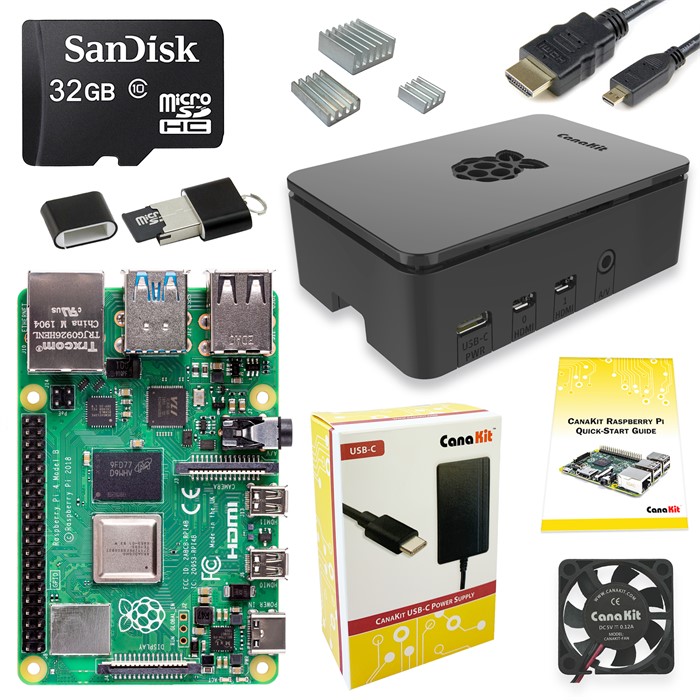
The CanaKit Raspberry Pi 4 Starter PRO Kit is the most-trodden route in cabinet building. The Pi 4’s emulation support is the most mature in the hobby: every front end targets it, every forum question about it has been asked and answered, and the kit is genuinely complete — pre-loaded 32GB card, fan case, heat sinks, a filtered 3.5A supply and an on/off switch, which matters more in a cabinet than on a desk. Its ceiling is real, though: the heaviest 3D arcade boards and later home consoles will test it, and shader-heavy configurations expose the older GPU.
Choose the Pi 4 when your library is the 2D golden age — which, for most cabinets, it honestly is — and when you value a setup that thousands of builders have already debugged for you.
Raspberry Pi 5: headroom in the same footprint
The RasTech Raspberry Pi 5 8GB Kit keeps everything that makes a Pi a good cabinet brain — tiny, cheap to power, silent at idle, appliance-like boot — and removes most of the ceiling. The Cortex-A76 at 2.4GHz with 8GB of RAM runs front ends noticeably snappier, handles heavier systems and shaders, and the included Active Cooler plus the proper 27W supply solve the Pi 5’s one cabinet-specific trap: throttling inside a closed, warm box. Dual 4Kp60 outputs are there if a second display (a marquee screen, say) is in your future.
Choose the Pi 5 when you are building once and building for years. The price gap over a Pi 4 kit is small against the life of the cabinet.
Mini PC: the Windows door stays open
The Beelink MINI S12 is the choice for builders whose plans include things a Pi simply cannot do: a Windows front end, PC-native arcade collections, or heavier systems that want an Intel CPU and a real SSD. The N95 processor, 8GB of DDR4 and 256GB SSD live in a box small enough to mount behind the monitor, with dual 4K HDMI outputs. Run Windows, run Linux, or install Batocera and treat it as an appliance — the hardware does not care.
The trade-offs are behavioral, not computational. A PC wants a shutdown ritual or a front-end configured to handle power cuts gracefully; it draws more power and makes more noise than a Pi; and “it is just a small Windows machine” cuts both ways when guests treat it like one. Choose the mini PC when the software plan demands it, not as a default.
The two shortcuts worth knowing
Not every cabinet needs a bare board. The Pimoroni Picade is built around a Raspberry Pi (Pi 5 recommended) with its HAT handling controls, audio and power — the tidiest Pi integration available. The Micro Center Atari Bartop Full Kit includes a Pi 3B+ with a licensed game card, which is entirely sufficient for its Atari library. And the Pandora Treasure 3D console skips the question altogether: the computer lives inside a 2-player control panel, ready to plug into a screen or drop into a cabinet as a brain-and-controls combo.
What each brain actually runs: the ceiling, system by system
Specifications blur together; ceilings are clearer in library terms. All three brains handle the 2D arcade canon — the 1980s and 1990s boards that fill most cabinets — without breaking stride, and all three drive a front end at 1080p comfortably. The differences appear at the edges. The Pi 4 begins to negotiate with demanding late-90s 3D arcade hardware and the more exacting home-console emulators, particularly with CRT shaders stacked on top; it plays the era, but it does not play all of it at full confidence. The Pi 5 pushes that boundary out substantially — its CPU is roughly two generations of progress in one step — and adds the RAM headroom that large, art-heavy front-end themes quietly consume. The N95 mini PC trades blows differently: its Intel graphics and Windows driver stack make it the natural home for PC-native collections and the handful of emulators that are Windows-first, and its SSD makes library management — tens of thousands of files — a non-event. None of these machines is the wrong answer for a classics cabinet. The question is only which edge of the library you intend to live on.
Heat, power and silence inside a wooden box
A cabinet is an enclosed, unventilated wooden volume that its owner expects to run for six-hour party sessions. That environment reorders priorities. The Pis sip power and make no noise of their own; their cooling (the CanaKit’s fan case, the RasTech’s Active Cooler) is insurance against the slow thermal soak of a closed cabinet, and it is why we recommend kit purchases over bare boards — the cooling and the correctly rated supply are already solved problems in the box. The mini PC draws more, exhausts warm air like the small computer it is, and asks for a vent path or a cabinet with breathing room at the rear. Sound follows the same gradient: a Pi build can be effectively silent behind a marquee; the PC will be faintly present in a quiet room. Small numbers, long evenings — worth weighing before the build, not after.
The verdict
- Golden-age library, proven path, least fuss: Pi 4 kit.
- One build, long horizon, heavier systems: Pi 5 kit — our default recommendation for new DIY cabinets.
- Windows software, PC collections, maximum flexibility: Beelink MINI S12.
- Whatever you choose: budget for cooling and a real power supply. More cabinet brains die of heat and under-voltage inside closed MDF than of old age.
One last consideration binds the hardware choice to the household: who else uses this machine? A Batocera Pi boots to the library and offers nothing else to break — the correct temperament for a cabinet that children and guests operate unsupervised. A Windows mini PC in the same room is a general-purpose computer wearing a cabinet as a costume, with all the configuration surface that implies. Builders who are their cabinet’s only user can ignore this entirely. Everyone else should weight it like a specification, because in practice it behaves like one.
Full specifications for each option are on its product page. If you are still deciding on the cabinet itself, our bartop vs. full-size guide is the place to start.