What a panel actually is
Strip the mystique away and an arcade control panel is a box of switches. Each button and each joystick direction closes a contact; a USB encoder board reads those contacts and presents them to the computer as a gamepad. Wiring one is not electronics — it is repetition with a labeling system. This tutorial covers the standard 2-player layout (two sticks, six to eight buttons per player, plus start and coin) using the zero-delay encoder kits most builders start with, and the parts-built alternative.
Parts for this build:
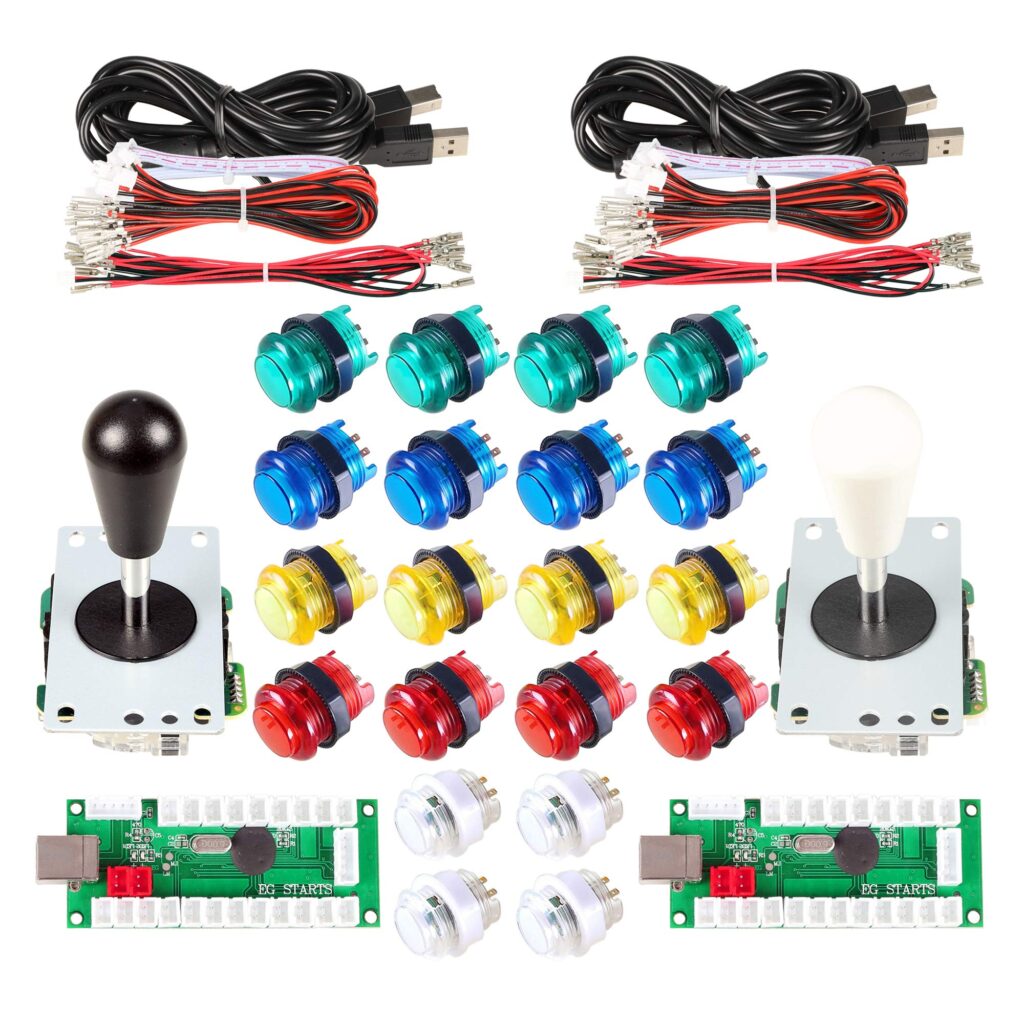
- A complete 2-player kit — the EG STARTS 2-Player Kit (bat tops) or the Hikig 2-Player Kit (ball tops), each with two encoders and harnesses included
- Or parts-built: a Sanwa JLF lever, Sanwa OBSF-30 buttons and a Reyann Zero Delay Encoder per player
- American-style alternative: the SJ@JX Happ Style kit
- A computer to test with, masking tape and a pen for labels, cable ties
Step 1 — Mount everything before wiring anything
Fit the joysticks and buttons into the panel first. Snap-in buttons (Sanwa OBSF style) push in from the top; American buttons thread a nut from beneath; LED kit buttons follow their kit pattern. Joysticks mount from below with the stick through the panel hole — check the stick’s orientation now: on a JLF, the 5-pin harness socket points in a defined direction, and rotating the stick 90 degrees in its mount is the difference between “up is up” and a very confusing first game. Leave the panel face-up on a towel, underside accessible on a raised edge or box.
Step 2 — Understand the encoder’s map
A zero-delay encoder has a labeled row of two-pin sockets: joystick directions, then button inputs (usually numbered or labeled K1–K12 and so on), plus 5V outputs for LED buttons on LED kits. Each encoder serves one player. Read the encoder’s printed map and decide your button order before plugging in a single wire — the physical layout on the panel (top row, bottom row) must match the logical order your front end will expect, or you will be remapping in software and re-explaining it to every guest.
Step 3 — Wire the joysticks
Kit sticks with a 5-pin harness are one plug: harness to stick, harness to the encoder’s joystick socket. Parts-built sticks are the same 5-pin pattern for a JLF. American sticks with individual microswitches wire four signal wires (up, down, left, right) plus a shared daisy-chained ground that hops from switch to switch. If a daisy chain is in your kit, keep it intact — it is one ground serving every switch, and it is supposed to look like that.
Step 4 — Wire the buttons, one player at a time
Each button gets a signal wire from the encoder and shares the ground chain. Work player 1 completely before touching player 2, and label each encoder’s USB cable at both ends (P1, P2) with tape. On LED kits, the buttons carry a third connection for the 5V light circuit — wire lights after controls are proven, so a lighting fault can never masquerade as a control fault. Polarity matters on LEDs and not on switches; if a button works but does not light, its light wires are reversed, not broken.
Step 5 — Start, coin, and admin buttons
Wire start and coin/select for each player to the encoder’s designated inputs. Add a dedicated exit or hotkey button only if your front end plan calls for it — every admin button on the panel face is a button a guest will press mid-game. Many builders put admin functions on shifted inputs (hold start, press coin) and keep the panel clean.
Step 6 — Bench-test before the panel goes in the cabinet
Plug each encoder into your computer and open a gamepad tester (or your front end’s input configuration). Walk every input, in order, and watch it register: four stick directions, every button, start and coin, for both players. Note any dead input immediately — the fault is almost always a connector not fully seated, and it is ten seconds now versus an hour inside a closed cabinet. Also confirm the players are not swapped, and that neither stick is rotated: test diagonals explicitly, because a rotated restrictor passes straight directions and fails diagonals.
Step 7 — Dress the wiring
Bundle each player’s harness with cable ties, keep USB cables clear of button tails, and leave a service loop — enough slack to lift the panel and rest it open without unplugging anything. Route the two USB cables to where the brain will live, labels visible. Close the panel.
Fault-finding, in the order faults actually occur
- Whole player dead: USB not seated, or the encoder’s USB cable is in the wrong port order for your front end.
- One button dead: its signal connector, then its ground branch.
- Directions scrambled: the stick is rotated in its mount, or the 5-pin harness is reversed.
- Buttons work, lights don’t: LED polarity or the 5V feed — controls and lights are separate circuits sharing a button body.
- Player 1 and 2 swapped: swap the USB cables at the brain, not the wiring at the panel.
Panel wired and proven, the next step is the computer it talks to — see setting up the brain. For the lever-and-button feel decision behind this build, our Sanwa vs. Happ guide covers the trade-offs.